Thursday, March 27, 2014


Tuesday, March 25, 2014


Tuesday, February 25, 2014
How to solve "Package gtk+-3.0 was not found" & "fatal error: gtk/gtk.h: No such file or directory" errors in Linux
As of now some of the Linux distros don't come up with the gtk-3.0 libraries and development files by default. Though Gnome application developers are asked to migrate to gtk3, most of the desktop applications are still in gtk2. Due to these reasons gtk3 development files are not pre bundled with distros. So, we have to install gtk3 development files, libraries manually to compile a gtk+-3.0 based GUI applications.
If your gtk3 program compilation ($gcc -o executable_name program_name `pkg-config --cflags --libs gtk+-3.0`) throws error something like this
Package gtk+-3.0 was not found
(or)
fatal error: gtk/gtk.h: No such file or directory
which means your machine is not installed with the gtk3 development files.
To install the package in debian based machines
$sudo apt-get install libgtk-3-dev
To install in rpm based machines
$yum install gtk3-devel
After the successful installation your machine should return output something like following while you execute the command
"sudo pkg-config --cflags --libs gtk+-3.0"
"-pthread -I/usr/include/gtk-3.0 -I/usr/include/pango-1.0 -I/usr/include/gio-unix-2.0/ -I/usr/include/atk-1.0 -I/usr/include/cairo -I/usr/include/gdk-pixbuf-2.0 -I/usr/include/freetype2 -I/usr/include/glib-2.0 -I/usr/lib/i386-linux-gnu/glib-2.0/include -I/usr/include/pixman-1 -I/usr/include/libpng12 -lgtk-3 -lgdk-3 -latk-1.0 -lgio-2.0 -lpangocairo-1.0 -lgdk_pixbuf-2.0 -lcairo-gobject -lpango-1.0 -lcairo -lgobject-2.0 -lglib-2.0
"
Now, you can compile your gtk3 programs happily... :)
If your gtk3 program compilation ($gcc -o executable_name program_name `pkg-config --cflags --libs gtk+-3.0`) throws error something like this
Package gtk+-3.0 was not found
(or)
fatal error: gtk/gtk.h: No such file or directory
which means your machine is not installed with the gtk3 development files.
To install the package in debian based machines
$sudo apt-get install libgtk-3-dev
To install in rpm based machines
$yum install gtk3-devel
After the successful installation your machine should return output something like following while you execute the command
"sudo pkg-config --cflags --libs gtk+-3.0"
"-pthread -I/usr/include/gtk-3.0 -I/usr/include/pango-1.0 -I/usr/include/gio-unix-2.0/ -I/usr/include/atk-1.0 -I/usr/include/cairo -I/usr/include/gdk-pixbuf-2.0 -I/usr/include/freetype2 -I/usr/include/glib-2.0 -I/usr/lib/i386-linux-gnu/glib-2.0/include -I/usr/include/pixman-1 -I/usr/include/libpng12 -lgtk-3 -lgdk-3 -latk-1.0 -lgio-2.0 -lpangocairo-1.0 -lgdk_pixbuf-2.0 -lcairo-gobject -lpango-1.0 -lcairo -lgobject-2.0 -lglib-2.0
"
Now, you can compile your gtk3 programs happily... :)
Thursday, February 20, 2014
How to view all feeds/articles (both read & unread) + How to change read status of a feed in feedly
How to view all feeds/articles (both read & unread) feedly
Since the closing announcement of google reader service from google, I have been engaged with feedly as my feed reader. Though there are many other rss/atom feed readers available in the web & in the app store, I do like feedly a lot. The main reason why I am using feedly as my rss aggregator is
1. I can import all my google reader subscriptions into feedly via OPML file seamlessly. (Ofcourse you must have downloaded the OPML file before the closing ceremony of google reader.)
2. feedly's simple yet intuitive design
3. Can be linked with your gmail account.
4. Can be configured in many devices & can sync
5. Can export the subscriptions into OPML file.
So, When I configured my feedly account & added new subscriptions It shows only a few latest feeds of a website as unread and all others as read. By default feedly shows only the unread article. So, If I want How I can see all the feeds from a particular subscription? There are 2 ways.
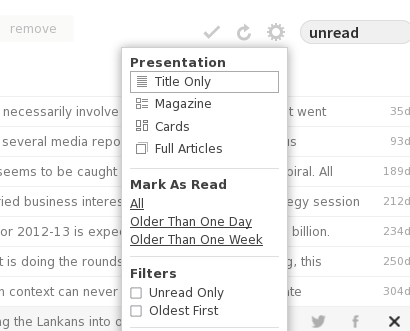
In Broser/web based login, Once you logged in you can see all your subscriptions.
1. When you click on a particular subscription in the right top of your screen you can see a gear wheel/ tooth wheel kind of symbol. Click on that and uncheck the option "unread only" under the category named filters.
2. In the Left bottom of you feedly home page one can find a link to "preferences". Click on that and go to "Hide read posts" and select option "No".

If you have further queries refer feedly's FAQ page & feedly's Knowledge base.
How to change read status of a feed in feedly
feedly has lot of shrotcuts to manage the feeds and subscriptions. If you want to know about all the shortcuts, Once you logged in into your feedly reader in web browser press "?" which lists all the available shortcuts..
If you want to change the read/unread status of an feed/article click on that article and press "m" which toggles the status.
To go to next feed/article press "n" or "j"
To go to previous feed/article press "p" or "k"
Since the closing announcement of google reader service from google, I have been engaged with feedly as my feed reader. Though there are many other rss/atom feed readers available in the web & in the app store, I do like feedly a lot. The main reason why I am using feedly as my rss aggregator is
1. I can import all my google reader subscriptions into feedly via OPML file seamlessly. (Ofcourse you must have downloaded the OPML file before the closing ceremony of google reader.)
2. feedly's simple yet intuitive design
3. Can be linked with your gmail account.
4. Can be configured in many devices & can sync
5. Can export the subscriptions into OPML file.
So, When I configured my feedly account & added new subscriptions It shows only a few latest feeds of a website as unread and all others as read. By default feedly shows only the unread article. So, If I want How I can see all the feeds from a particular subscription? There are 2 ways.
In Broser/web based login, Once you logged in you can see all your subscriptions.
1. When you click on a particular subscription in the right top of your screen you can see a gear wheel/ tooth wheel kind of symbol. Click on that and uncheck the option "unread only" under the category named filters.
2. In the Left bottom of you feedly home page one can find a link to "preferences". Click on that and go to "Hide read posts" and select option "No".
If you have further queries refer feedly's FAQ page & feedly's Knowledge base.
How to change read status of a feed in feedly
feedly has lot of shrotcuts to manage the feeds and subscriptions. If you want to know about all the shortcuts, Once you logged in into your feedly reader in web browser press "?" which lists all the available shortcuts..
If you want to change the read/unread status of an feed/article click on that article and press "m" which toggles the status.
To go to next feed/article press "n" or "j"
To go to previous feed/article press "p" or "k"
Monday, February 17, 2014
Interim Budget 2014-15 by UPA Govt.,
UPA government submitted interim budget
1. Automobile & phone cost will cheap.
2. Service tax levied for rice
3.
. . .
A #cartoon by karthik
#UPA #budget #tax
 |
| Interim Budget 2014-15 by UPA Govt., |
Subscribe to:
Posts (Atom)